
Top 15 Endpoint Security Solutions and How to Choose


See Venn first in Google Search
Add as a preferred source on Google
TL;DR: Endpoint security solutions protect laptops, servers, and mobile devices from malware, ransomware, and phishing. Best for BYOD and contractor laptops: Blue Border by Venn. Best for enterprise EDR: CrowdStrike Falcon. Best for autonomous response: SentinelOne Singularity Endpoint. Best for Microsoft estates: Microsoft Defender for Endpoint.
What Are Endpoint Security Solutions?
Endpoint security solutions protect user devices (laptops, phones, servers) from cyber threats like malware, ransomware, and phishing by providing advanced prevention, detection, and response, often through Endpoint Protection Platforms (EPP) (antivirus, firewall) and Endpoint Detection & Response (EDR) (behavioral analysis, investigation) managed centrally. They combine AI-driven threat prevention, behavioral detection, and automated remediation to stop ransomware, zero-day exploits, and phishing attempts before they can compromise an organization.
Key vendors include remote work solutions like Venn and IBM MaaS360, and endpoint security solutions like CrowdStrike Falcon and SentinelOne Singularity Endpoint, offering features like AI-driven threat hunting, zero-day protection, and centralized visibility for IT teams to secure devices in complex environments.
Modern endpoint security relies on an integrated stack of technologies that keep distributed workforces secure.
The endpoint landscape is shifting quickly as ransomware becomes more extortion-driven and as autonomous AI agents move from experimental tools to working parts of security operations. Modern platforms increasingly pair machine-speed detection and response with human oversight, while defenders also work to secure the AI agents now running on endpoints themselves.
Key types of endpoint security:
- Remote work solutions: Support distributed teams via cloud-based infrastructure, secure workspaces, and remote access platforms.
- Endpoint protection platforms (EPP): Baseline defense with antivirus, anti-malware, and firewalls to prevent known threats.
- Endpoint detection and response (EDR): Focuses on detecting and responding to advanced threats using behavioral analytics and threat hunting.
- Extended detection and response (XDR): Integrates endpoint data with other security layers (network, cloud, email) for broader visibility.
- Managed detection and response (MDR): Outsources management of endpoint protection to a service provider with expertise.
- Next-generation antivirus (NGAV): Uses machine learning and behavioral analysis to detect fileless attacks and zero-day threats that evade signature-based tools.
Leading endpoint security solutions:
- Blue Border by Venn: A secure workspace that protects company data, applications, and AI workflows on any personal, BYOD unmanaged, or third-party laptop.
- CrowdStrike Falcon: Lightweight agent delivering AI-powered real-time protection and adversary-driven threat intelligence.
- SentinelOne Singularity: Autonomous threat detection, continuous monitoring, and automated remediation from a single agent.
- Microsoft Defender for Endpoint: Native, OS-integrated protection with deep visibility across Windows, macOS, and Linux.
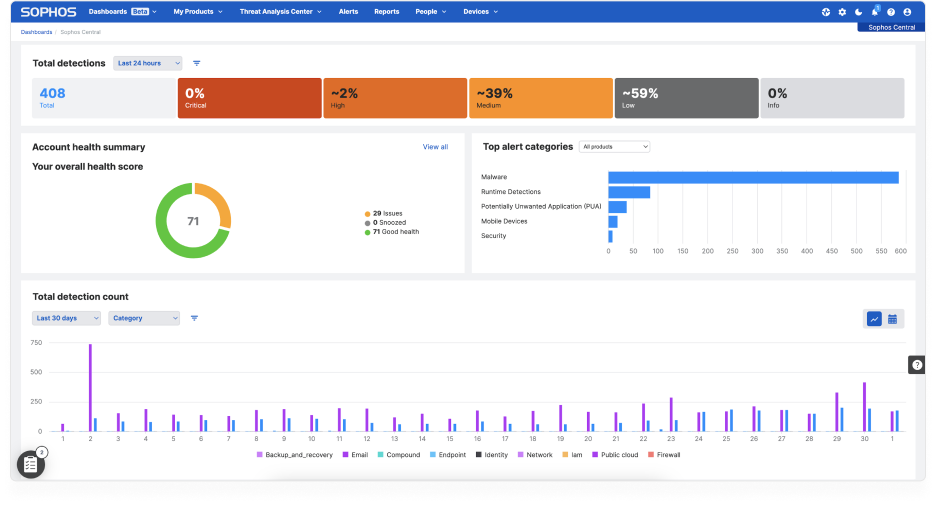
- Sophos Endpoint: Centralized management with behavioral analytics and built-in data protection to stop ransomware.
Better Endpoint Security for Contractors – on Unmanaged Devices
Discover the top solutions for providing secure remote access to contractors on unmanaged laptops. No shipping hardware, no VDI.

In this article:
- What Are Endpoint Security Solutions?
- Endpoint Security Solutions at a Glance
- How Endpoint Security Differs from Traditional Antivirus
- Key Types of Endpoint Security Solutions
- The Rise of Agentic AI in Endpoint Security
- Notable Endpoint Security Solutions
- How to Choose the Right Endpoint Security Solution
Endpoint Security Solutions at a Glance
The table below summarizes the key differences between the solutions covered in this article, including who each one suits, its main strengths, and the trade-offs to weigh. We explore each solution in more detail further down.
| Category | Solution | Best For | Key Strengths | Things to Consider |
|---|---|---|---|---|
| Remote work | 1. Blue Border® | Securing work on BYOD and contractor laptops without VDI | Company-controlled secure enclave with DLP, AI governance, and audit logs | Performance varies on lower-spec devices |
| Remote work | 2. IBM MaaS360 | Managing and securing mixed mobile and laptop fleets | Unified multi-OS console with built-in threat detection | Console complexity and a dated interface in places |
| Remote work | 3. Kitecyber | Consolidating BYOD device, web, data, and access control | Single agent spanning UEM, DLP, web gateway, and ZTNA | Endpoint-first design with limited agentless coverage |
| EPP / EDR | 4. CrowdStrike Falcon | Enterprises needing EDR with adversary threat intelligence | One lightweight sensor with agentic AI triage and response | Module-based pricing and a steep console learning curve |
| EPP / EDR | 5. SentinelOne Singularity Endpoint | Teams wanting autonomous detection and one-click rollback | On-device behavioral AI with Storyline attack correlation | Console complexity and exclusions for false positives |
| EPP / EDR | 6. Bitdefender GravityZone | Smaller IT teams needing layered endpoint defense | Ransomware rollback plus network attack and web filtering | Console navigation and notable memory consumption |
| EPP / EDR | 7. Sophos Endpoint | Prevention-first protection with defaults enabled by default | 60+ exploit mitigations and CryptoGuard ransomware rollback | Locating specific settings and slow support at times |
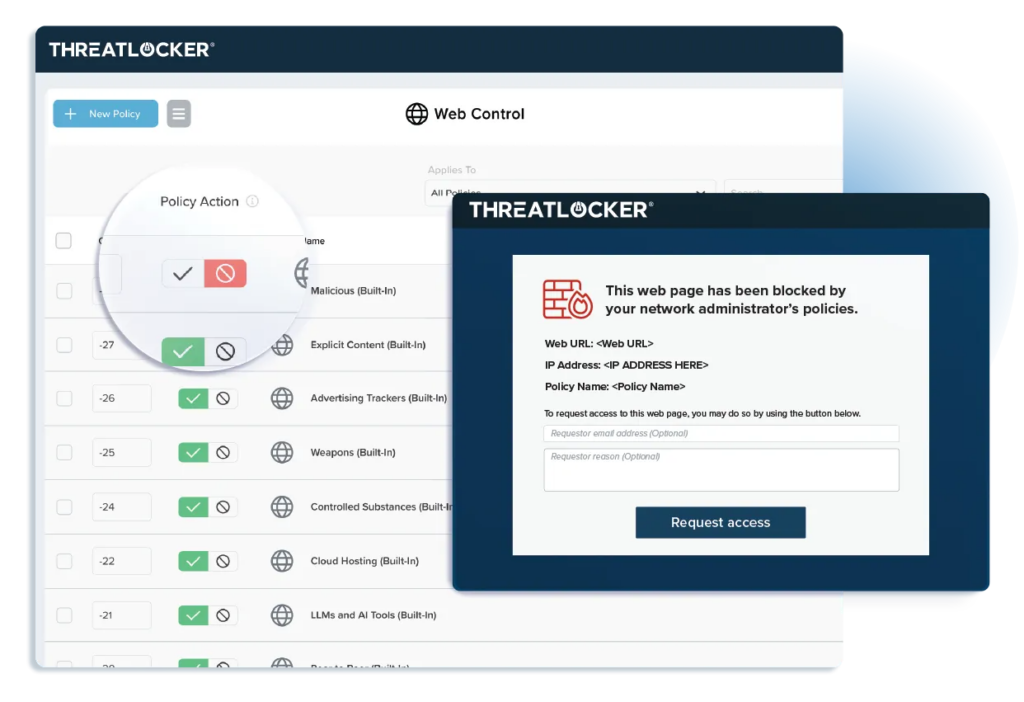
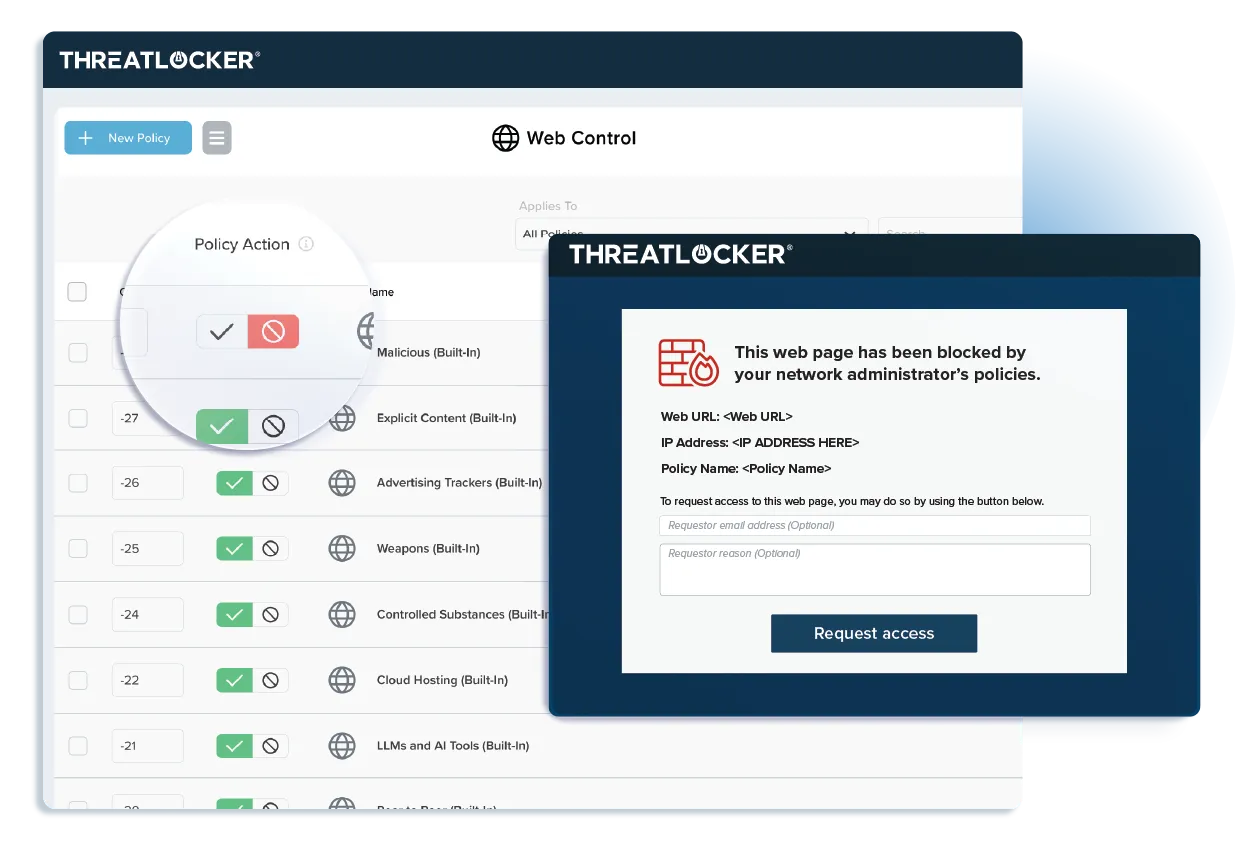
| EPP / EDR | 8. ThreatLocker Detect | Policy-driven EDR with real-time on-device enforcement | Customizable IoC policies and automatic device isolation | Administrative overhead during policy tuning |
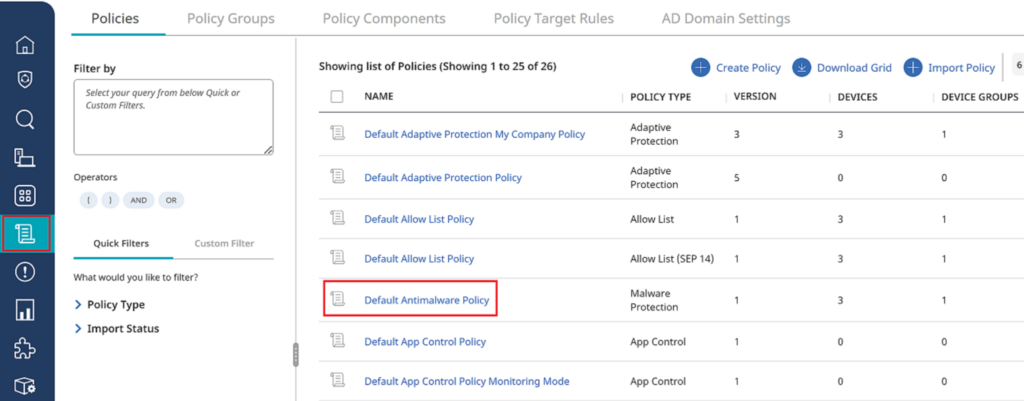
| EPP / EDR | 9. Symantec Endpoint Security Complete | Consolidating protection onto one agent and console | Adaptive Protection with deception and AD defense | Heavy endpoint footprint and mobile support gaps |
| EPP / EDR | 10. Check Point Harmony Endpoint | Consolidating EPP, EDR, and XDR into a single client | ThreatCloud AI engines with DLP and full disk encryption | Resource use during scans on lower-spec devices |
| EPP / EDR | 11. Microsoft Defender for Endpoint | Microsoft-centric estates wanting native protection | Automatic attack disruption and exposure management | E5 licensing for advanced response capabilities |
| XDR / MDR | 12. TrendAI Vision One Endpoint Security | Consolidating endpoint, cloud, email, and network detection | Native EDR and XDR with cyber risk exposure management | Cluttered console and a heavy agent on endpoints |
| XDR / MDR | 13. Palo Alto Networks Cortex XDR | Correlating endpoint, network, cloud, and identity telemetry | Root cause analysis with technique-specific prevention modules | Windows-first feature depth and complex implementation |
| XDR / MDR | 14. Barracuda Managed XDR Endpoint Security | Outsourcing endpoint monitoring to a 24/7 external SOC | SOC-led containment with one-click ransomware rollback | Limited self-service management and report customization |
| XDR / MDR | 15. Huntress Managed EDR | Smaller teams and MSPs needing SOC-backed endpoint coverage | 24/7 AI-assisted SOC with active threat remediation | Limited alert and report customization options |
How Endpoint Security Differs from Traditional Antivirus
Traditional antivirus software focuses primarily on detecting and eliminating known malware using signature-based detection. This method involves scanning files and processes for patterns that match a database of recognized threats. While effective against established viruses and malicious code, antivirus alone struggles to keep up with emerging threats and advanced attacks, such as zero-day exploits, fileless malware, or ransomware variants that rapidly evolve beyond static signatures.
Endpoint security solutions offer a much broader defense. They combine antivirus engines with behavioral analysis, machine learning, and threat intelligence to uncover suspicious activity even when no known malware signature is present. Endpoint security products also include features like device management, policy enforcement, vulnerability assessment, and automated incident response. By integrating multiple layers of protection and analysis, endpoint security counters a wide spectrum of threats, providing more complete coverage for modern enterprise environments. This broader approach matters more as ransomware shifts toward multi-layered extortion, with recent industry research finding that data theft without encryption has climbed sharply and that ransomware now features in a large share of analyzed breaches, especially at smaller organizations.
Key Types of Endpoint Security Solutions
Remote Work Solutions
Remote work solutions combine multiple technologies to support distributed teams. Modern environments rely on cloud-based infrastructure, secure workspaces, remote access platforms, collaboration tools, and workforce management systems. Instead of depending only on VPNs and email, organizations now use integrated platforms that provide secure access to applications, centralized communication, and scalable cloud resources.
These solutions typically fall into several categories. Secure workspace and remote desktop tools isolate or deliver work environments securely. Remote access platforms use identity-based controls and zero-trust approaches to limit exposure. Collaboration and project management tools centralize communication and task tracking, while workforce management systems handle scheduling, compliance, and productivity monitoring.
Endpoint Protection Platforms (EPP)
Endpoint Protection Platforms (EPP) are comprehensive security suites that provide a centralized set of tools aimed at preventing malware, ransomware, and other malicious activities on endpoint devices. EPP solutions typically include antivirus, anti-malware, personal firewalls, and device control features all managed from a single interface.
They harness traditional signature-based detection while integrating more advanced techniques like heuristic analysis and sandboxing to identify unknown threats. The main goal of EPP is to block threats before they infiltrate endpoint devices and the wider network. EPP is widely adopted in enterprises for its ease of deployment and management, especially in environments with diverse devices and operating systems.
Endpoint Detection and Response (EDR)
Endpoint Detection and Response (EDR) solutions go beyond prevention, focusing on detecting, investigating, and responding to advanced threats that evade traditional defenses. EDR tools continuously monitor endpoint activity, collecting detailed telemetry such as process creation, file modification, and network connections.
When suspicious activity is detected, EDR provides analysts with rich contextual data and forensics to trace the origin, timeline, and impact of threats, enabling more precise containment and remediation. EDR equips security teams to perform proactive threat hunting and alerts them to indicators of compromise even if the attack payload is novel or fileless. Increasingly, agentic AI is layered on top of EDR to autonomously enrich alerts, correlate signals, and handle much of the routine Tier-1 investigation, closing low-risk cases and escalating genuine threats so analysts can focus on higher-value work.
Extended Detection and Response (XDR)
Extended Detection and Response (XDR) builds upon the foundations of EDR by aggregating security data not just from endpoints, but from across the entire IT environment: servers, cloud workloads, email, and network traffic. XDR platforms correlate signals from these diverse sources to improve detection accuracy, eliminate visibility blind spots, and simplify investigation workflows.
By unifying security telemetry, XDR helps security teams piece together multi-stage attacks that would otherwise evade isolated security tools. Beyond detection, XDR automates response actions across multiple domains. For example, when an endpoint alert is triggered, XDR can simultaneously update email security rules, block malicious domains at the firewall, and quarantine affected files in the cloud.
Related content: Read our guide to edr vs xdr
Managed Detection and Response (MDR)
Managed Detection and Response (MDR) services take endpoint protection further by providing outsourced security operations and expertise. With MDR, a third-party provider continuously monitors, investigates, and responds to threats on behalf of the organization, leveraging a combination of EDR, threat intelligence, and human analysis.
This approach enables organizations without sizable in-house security teams to access advanced capabilities and around-the-clock protection. MDR providers also help organizations respond rapidly to incidents by delivering tailored guidance, hands-on remediation, and post-incident analysis. They offer actionable intelligence to improve overall security posture and can adapt coverage as the threat landscape changes. Many providers now operate a human-on-the-loop model, in which autonomous agents carry out first-line monitoring and triage at machine speed while experienced analysts validate findings and sign off on higher-impact response actions.
Next-Generation Antivirus (NGAV)
Next-Generation Antivirus (NGAV) replaces legacy, signature-based antivirus by leveraging machine learning and behavioral analysis to protect endpoints in near real time. Rather than matching files against a database of known threats, NGAV builds models of normal system activity, spots anomalies, and stops attacks even when no signature exists.
This approach is particularly effective against fileless attacks, malicious scripts, and zero-day vulnerabilities that evade traditional antivirus. NGAV is typically cloud-based and forms the prevention layer within modern EPP and EDR platforms, analyzing code behavior before execution to block threats early.
The Rise of Agentic AI in Endpoint Security
Agentic AI is reshaping how endpoints are defended and attacked. On the defensive side, autonomous agents now reason over correlated telemetry from endpoints, network, cloud, and identity, then plan and execute investigation and containment steps with limited human prompting. This marks a shift from static, playbook-driven automation to supervised autonomous operations, where agents monitor, investigate, and respond continuously within policy guardrails.
The appeal is speed and scale. Autonomous agents can detect anomalies, investigate root causes, and initiate containment far faster than manual triage, helping lean teams keep pace with rising attack volumes. Most organizations run these capabilities in constrained deployments with human oversight at critical decision points, gating high-impact actions behind confidence thresholds and least-privilege access.
At the same time, agentic AI expands the attack surface. Autonomous agents running on endpoints introduce new risks such as privilege escalation, persistence, and lateral movement, and attackers can target the agents themselves through prompt injection or tool and API manipulation. Because an agent’s actions may span multiple systems, tracing an incident back to its root cause is harder than with traditional software.
The practical takeaway is to treat agentic AI as both a capability and a risk surface. Effective programs pair autonomous detection and response with disciplined guardrails, strong auditability, least-privilege tool access, and ongoing red teaming, so that autonomy can expand safely as the technology matures.
Notable Endpoint Security Solutions
How we selected these tools: We shortlisted endpoint security solutions based on threat prevention and detection depth, endpoint detection and response capabilities, coverage across operating systems and device ownership models, data protection and policy controls, and the amount of management or managed service each one requires.
Remote Work Solutions
1. Blue Border®

Best for: Securing company data on BYOD and contractor laptops without VDI
Strengths: Company-controlled secure enclave with DLP, AI governance, and audit logs
Things to consider: Performance varies on lower-spec devices
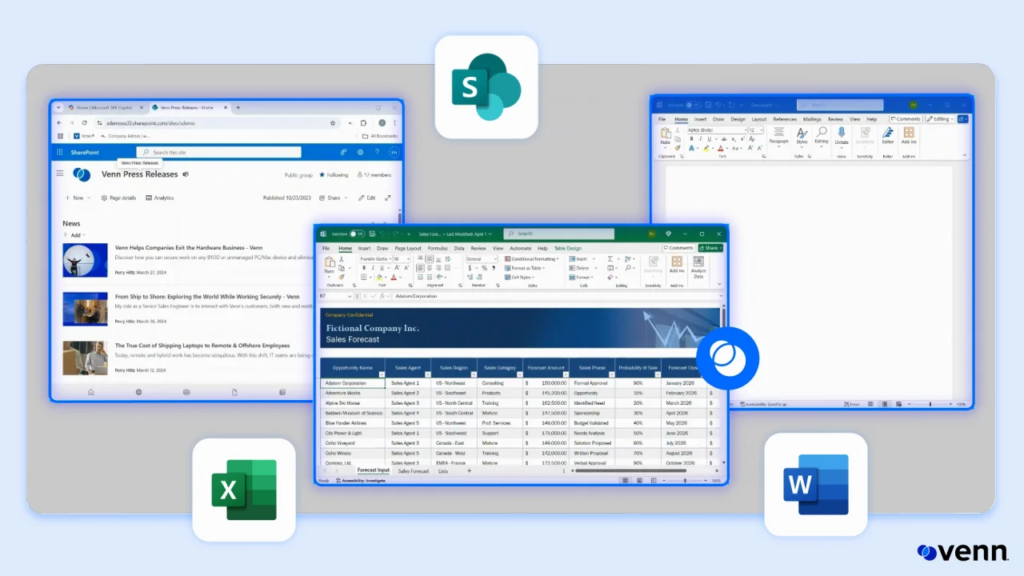
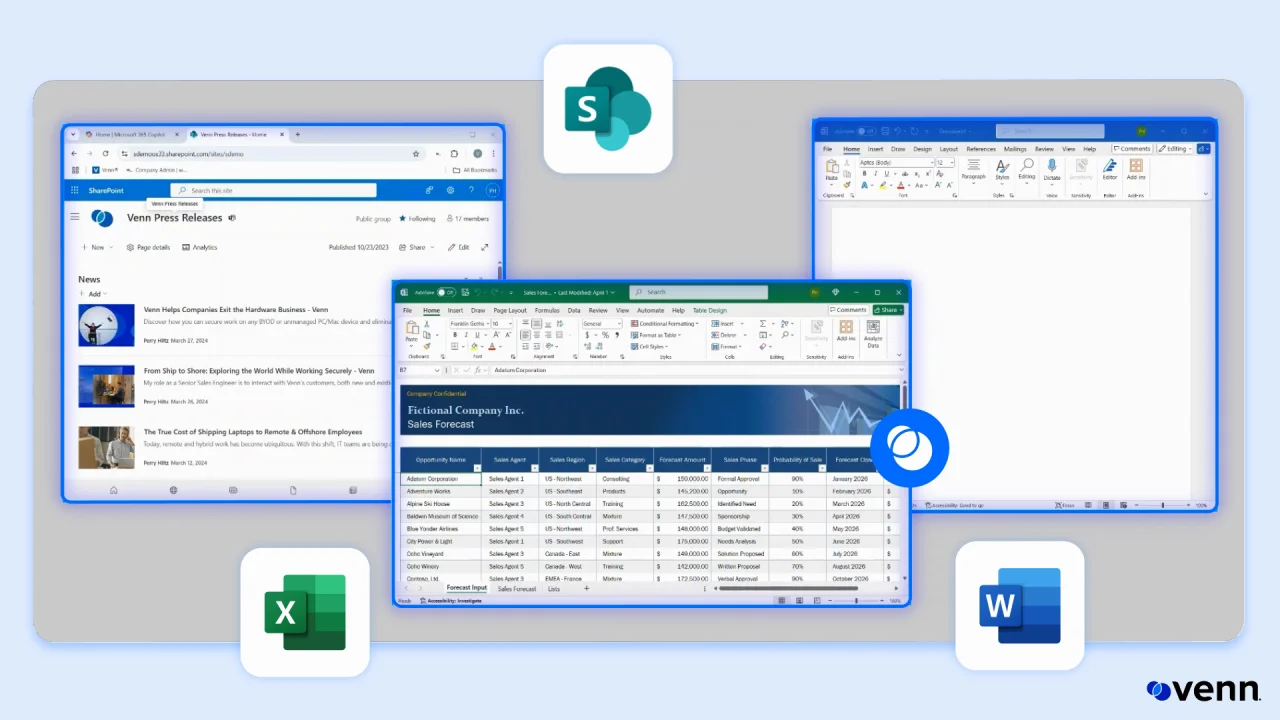
Blue Border creates a company-controlled secure enclave on a user’s own PC or Mac. Company data, applications, and AI workflows run inside that enclave, isolated from any other use on the same computer. Work applications run locally rather than on a remote server, and are marked by a blue line around the application window.
The enclave acts like a firewall around business activity, enforcing data loss prevention rules and controlling what data can move in and out. Outside Blue Border, personal activity stays private and is not visible to the company or to Venn. There is no backend infrastructure to deploy, so onboarding and offboarding happen in minutes.
Key features include:
- Secure enclave on unmanaged devices: Installing Blue Border on a Mac or PC creates a company-controlled secure enclave where all data is encrypted and access is managed. Work applications run locally within the enclave, isolated from personal use on the same computer, without remotely hosting the desktop or enrolling the entire device.
- Data loss prevention controls: Policies govern what data can move in and out of the enclave, covering copy and paste between work and personal apps, printing, downloads, screen capture, and screen sharing. The enclave enforces these rules at the application and data layer rather than at the network perimeter.
- AI tool governance: Blue Border controls which AI tools can be used, which specific tenants can be accessed, and what data can be copied, pasted, uploaded, or entered into an AI tool. Policy is set once and applied across every worker’s device, whether managed or unmanaged, covering browser-based and locally installed AI applications alike.
- Local application performance: Users run native installed applications instead of virtual desktops. Protected apps include Chrome, Adobe, Slack, Microsoft Office applications, web conferencing tools such as Zoom and Teams, VOIP applications, CAD and design tools, SAP, and custom business applications. Users toggle between enclave and personal use.
- Privacy separation: Venn Privacy Shield keeps activity outside the enclave unmonitored, so personal files, email, and personal AI tools cannot be seen or tracked by the company. The separation is architectural rather than policy-based, which addresses the workarounds users adopt when they believe personal activity is being observed.
- Compliance and audit visibility: The platform is built to comply with SOC 2 Type II, HIPAA, SEC, FINRA, NAIC, NYS DFS, Mass 201 CMR 17.00, CMMC, and PCI standards. Administrators get real-time insight into where, when, and from what device a user accessed an application or sensitive data, alongside device compliance checks.
- Application delivery and offboarding: Venn Application Delivery deploys and maintains applications across all Venn-enabled devices from a central point. Centralized administration covers the BYOD fleet, and offboarding is a single remote wipe with no managed hardware to reclaim from the user.
Limitations (as reported by users on G2):
- Performance on some hardware: Several administrators report the enclave feeling slow on certain devices, including machines that exceed the stated hardware requirements.
- Policy tuning at rollout: Security controls can feel restrictive until policies are adjusted to match how each team actually works, so deployments benefit from planning and user onboarding.
- Customization and reporting scope: Some reviewers wanted broader customization options and more detailed reporting than the console currently exposes.
Source: Venn
2. IBM MaaS360

Best for: Managing and securing mixed mobile and laptop fleets
Strengths: Unified multi-OS console with built-in threat detection
Things to consider: Console complexity and a dated interface in places
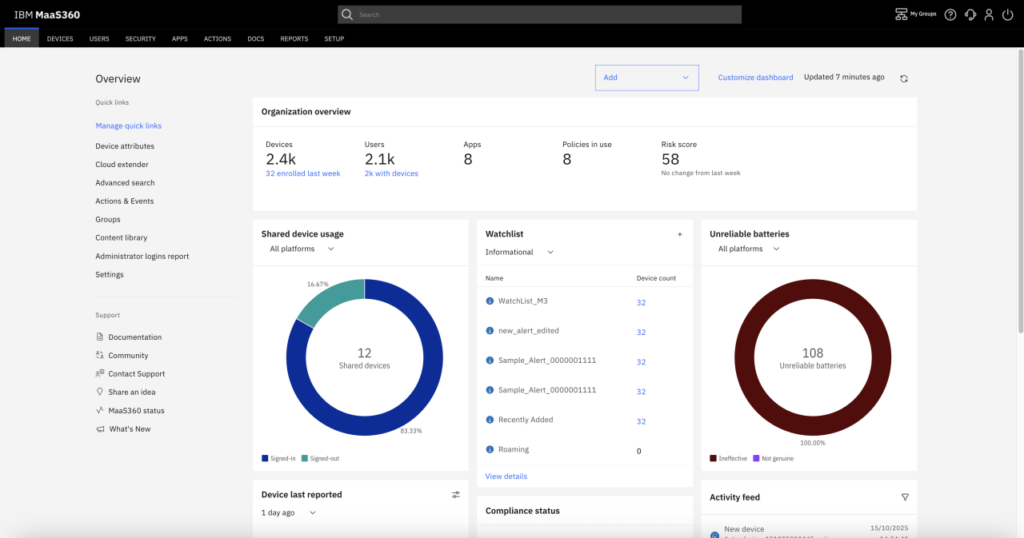
IBM MaaS360 is a unified endpoint management platform for managing and securing mobile devices and laptops from a centralized console. It provides multi-OS device management with built-in threat detection, automated compliance, and integrations with other security and productivity tools.
The platform supports a zero trust approach using native on-device protection and analytics, with Watson AI applied to endpoint security and management decisions. A Fast Start option targets smaller organizations that need phones and tablets onboarded and secured quickly from a single dashboard.
Key features include:
- Unified endpoint management: Administrators automate and simplify endpoint management across mobile devices and laptops from one console, supporting hybrid and frontline workforces. The platform handles multi-OS environments, so mixed fleets of phones, tablets, and laptops are managed without separate tools per platform.
- Mobile threat defense: Mobile threat defense secures users, devices, apps, and data against threats including malware, man-in-the-middle attacks, and phishing, using zero-touch automated protection. This extends the platform past configuration management into active threat detection on the device.
- Mobile device management and Fast Start: Mobile device management provides the visibility, control, and security to manage devices at scale. For smaller businesses, Fast Start offers a path to get devices onboarded, secured, and ready to use quickly, with built-in protection, automated setup, and a single dashboard.
- Native on-device security: The platform identifies and responds to threats in near real time using native on-device protection, smart analytics, and full visibility across the fleet. Detection runs locally on the endpoint rather than depending entirely on cloud analysis to reach a verdict.
- AI-driven analytics: Built-in Watson AI supports endpoint security and management decisions, identifying mobile threats and generating insights and policy recommendations. These analytics are applied to both the security posture and day-to-day management of managed devices.
- Integrations without migration: MaaS360 connects with security and productivity applications to streamline updates and sync data, so organizations can act on data from existing systems inside the same console rather than migrating away from tools already in place.
Limitations (as reported by users on G2):
- Console complexity: Reviewers describe the interface as complex for new administrators, with the more advanced features taking time to configure correctly.
- Interface age: Several note that the UI feels dated and clunky in parts, which slows routine navigation and day-to-day administration.
- Reporting depth: Reporting tools are described as less intuitive than expected, and documentation is said to lack depth in some areas.
- Support responsiveness: Occasional delays in support responses are reported.
- Operating system dependencies: Some security features are available only on certain Android and iOS versions, which limits coverage on older devices.
3. Kitecyber

Best for: Consolidating BYOD device, web, data, and access control
Strengths: Single agent spanning UEM, DLP, web gateway, and ZTNA
Things to consider: Endpoint-first design with limited agentless coverage
Kitecyber protects corporate data on personal devices using AI-driven threat detection, zero-trust enforcement, and endpoint management. Rather than relying on traditional device management alone, it enforces granular access controls with real-time sensitive data detection, classification, and remediation while preserving employee privacy.
The platform consolidates device management, secure web gateway, data loss prevention, and zero trust private access into a single agent built on a device trust engine. Enforcement happens on the endpoint, which removes cloud gateways and VPN appliances from the traffic path.
Key features include:
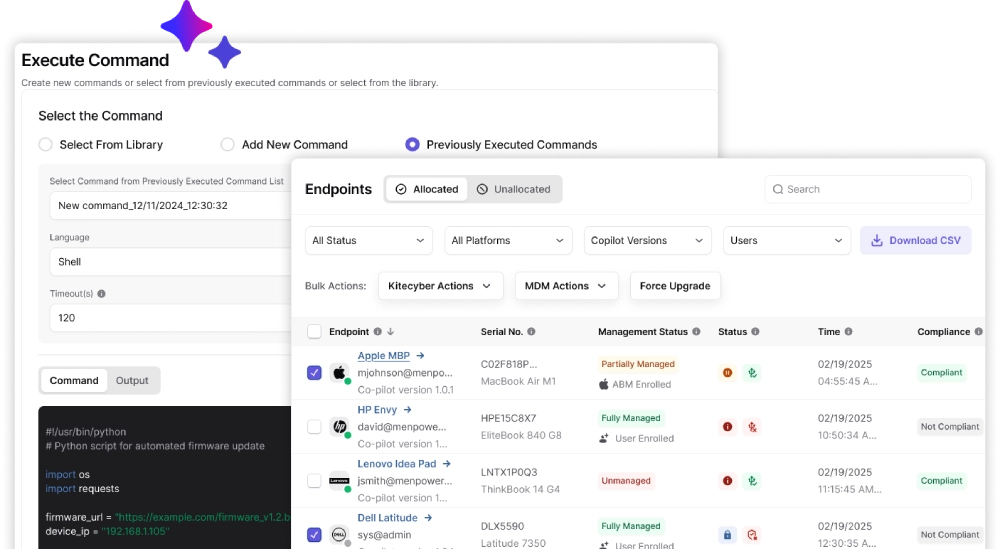
- Unified endpoint management: Kitecyber manages Windows, macOS, and Linux endpoints through one console, covering corporate-owned devices, personal BYOD machines, and third-party contractor hardware. Compliance and security policies are enforced centrally across that mixed fleet from a single agent.
- Data loss prevention at rest and in motion: The platform scans Windows, macOS, and Linux devices for sensitive files, including personal, health, and payment information. Administrators can remotely encrypt or delete data found on employee devices, and controls extend across endpoints, internet traffic, and SaaS applications.
- Endpoint-based secure web gateway: Internet-based ransomware threats are blocked before users interact with them, with web traffic filtered at the endpoint rather than routed through a cloud gateway. The same layer covers SaaS application access and generative AI usage.
- Real-time identity theft protection: Multi-model AI inference runs directly on endpoints and activates when a user clicks a link, so detection happens at the moment of use rather than when a link is shared. Coverage extends beyond email to desktop apps, conferencing tools, instant messaging, and social media.
- Zero trust enforcement: Devices must meet the organization’s compliance and security policies before being granted access to corporate resources. Access to sensitive resources is further restricted through granular access controls and application sandboxing on the device itself.
- Zero trust private access: The platform establishes encrypted connections between remote users or devices and the organization’s network as a replacement for legacy VPN, protecting data transmitted over the internet without appliances in the path.
Limitations (as reported by users on G2):
- Endpoint-first architecture: The platform concentrates on endpoint enforcement and offers less native network-level or agentless protection for unmanaged personal devices.
- Reporting dashboard volume: The dashboard can feel overwhelming given the amount of real-time telemetry it aggregates from device management, data loss prevention, and web gateway logs simultaneously.
- Advanced setting discoverability: Some advanced options take time to locate, and reviewers asked for more customization and deeper analytics in reporting.
- Configuration sync timing: Pushing configuration to endpoints sometimes takes longer than expected, and a few reviewers asked for tighter regression testing of new patches.
- Roadmap pace: Delays in the rollout of announced features are mentioned.
Source: Kitecyber
Endpoint Security Solutions
4. CrowdStrike Falcon

Best for: Enterprises needing EDR with adversary threat intelligence
Strengths: One lightweight sensor with agentic AI triage and response
Things to consider: Module-based pricing and a steep console learning curve
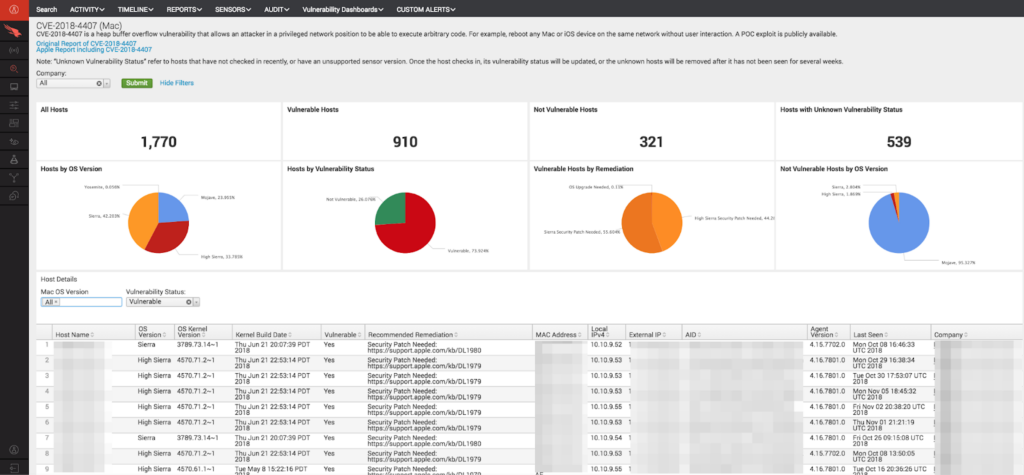
CrowdStrike Falcon provides endpoint protection, detection, and response backed by adversary intelligence and native AI. A single lightweight sensor deploys in minutes and protects every major operating system, giving fleet-wide visibility with minimal local resource use and no on-premises infrastructure to maintain.
Detection combines AI-powered analysis, adversary intelligence, and indicators of attack to identify ransomware, lateral movement, and stealthy intrusions. Protection extends beyond endpoints across the Falcon platform, with 10GB per day of third-party data ingest available through Falcon Next-Gen SIEM.
Key features include:
- Single lightweight sensor: One sensor deploys across all major operating systems in minutes and delivers protection, fleet-wide visibility, and scale without heavy local signature updates. This removes the multiple agents and tool sprawl associated with legacy antivirus suites.
- Falcon Insight XDR: The endpoint detection and response component is backed by threat intelligence and native AI, producing context-rich detections driven by adversary behavior and indicators of attack rather than file signatures alone.
- Charlotte AI: Generative and agentic AI triages detections, investigates incidents, summarizes findings, and automates response actions. It handles detection triage and drives autonomous response, which CrowdStrike states cuts mean time to respond from hours to minutes.
- Cross-domain detection: Falcon unifies visibility across the platform to expose threats that siloed tools miss, correlating activity across endpoints, cloud workloads, and identity. Third-party data can be ingested into Falcon Next-Gen SIEM to widen that correlation.
- Next-generation antivirus: Falcon Prevent protects endpoints from modern attacks as a replacement for legacy antivirus, applying AI-driven defense instead of signature scanning and scheduled local scans.
- Device and firewall control: Falcon Device Control provides USB device control across the fleet, and Falcon Firewall Management delivers centralized host firewall policy enforcement from the same console and agent.
- Mobile and forensics coverage: Falcon for Mobile extends endpoint security to Android and iOS devices, while Falcon Forensics automates forensic data collection, enrichment, and correlation to support investigations after an incident.
Limitations (as reported by users on G2):
- Cost and module structure: Reviewers frequently describe pricing as high for smaller organizations, with capabilities such as identity telemetry, vulnerability management, and automation requiring separately licensed modules.
- Console learning curve: The interface is described as dense and at times cluttered, with new administrators needing time to navigate tabs and locate advanced policy settings.
- Query language proficiency: Getting full value from threat hunting requires learning CrowdStrike’s query language, which reviewers moving from other platforms found challenging.
- Alert tuning: Out of the box the platform can generate high alert volume, and policy tuning is needed to separate critical detections from noise, particularly where custom scripts and development tools are in use.
- Policy propagation delay: Several reviewers report that configuration and policy changes can take a long time to apply to hosts and device groups.
- Support variability: Response times are reported as inconsistent for more complex issues.
Source: CrowdStrike Falcon
5. SentinelOne Singularity Endpoint

Best for: Teams wanting autonomous detection and one-click rollback
Strengths: On-device behavioral AI with Storyline attack correlation
Things to consider: Console complexity and exclusions for false positives
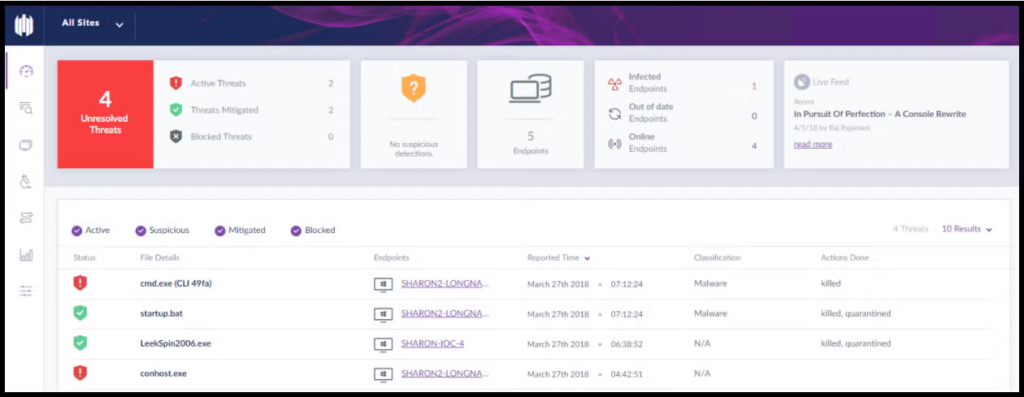
Singularity Endpoint combines endpoint protection, endpoint detection and response, and automated remediation in a single unified agent. It operates across SaaS, on-premises, hybrid, and air-gapped environments, protecting workstations, cloud workloads, and mobile devices from one console.
Behavioral AI runs on the device, so protection continues when endpoints are offline and does not depend on constant signature updates. Detection identifies malicious activity by how processes behave, then contains threats autonomously and rolls affected systems back to a trusted state.
Key features include:
- Autonomous AI-based protection: Static and behavioral AI engines run on the device to prevent ransomware, zero-day exploits, supply chain attacks, and fileless malware in real time. Because the engines operate locally, protection is maintained on endpoints whether they are online or disconnected.
- One-click rollback and remediation: The platform contains threats and reverses unauthorized changes, restoring systems to a trusted state without re-imaging. It can automatically isolate devices, terminate malicious processes, and roll back changes made during an attack.
- Storyline correlation: Related events are automatically linked into attack narratives that give analysts real-time context on how an attack progressed across a system, replacing manual work assembling a timeline from separate logs.
- Unified agent across surfaces: The same agent that protects endpoints also defends identity, detecting credential theft, privilege escalation, and lateral movement across Active Directory and cloud identity providers including Entra ID, Okta, Ping, SecureAuth, and Duo.
- Mobile threat defense: Singularity Mobile provides on-device protection for iOS, Android, and ChromeOS against phishing, malware, exploits, and risky apps, with continuous app vetting for privacy and security risks. It requires no device management enrollment and works without connectivity.
- Managed detection option: Wayfinder MDR adds 24/7 monitoring, investigation, and response from SentinelOne analysts working alongside the platform’s AI, for organizations that cannot staff continuous coverage internally.
Limitations (as reported by users on G2):
- Console usability: Reviewers describe the user interface as complicated and not consistently intuitive, with manually traced investigations difficult to locate in the UI.
- False positives and exclusions: The agent blocks batch files and automated processes often enough that teams maintain exclusion lists, and false positive volume is a recurring theme in reviews.
- Endpoint performance: Some reviewers report noticeable performance impact on endpoints attributable to the agent.
- Migration and compatibility: Agent issues during migration and compatibility troubleshooting with certain applications are reported.
- Pricing tiers: Full endpoint detection and response functionality sits in higher-tier plans, and reviewers describe pricing as being on the higher side.
Source: SentinelOne
6. Bitdefender GravityZone
Best for: Smaller IT teams needing layered endpoint defense
Strengths: Ransomware rollback plus network attack and web filtering
Things to consider: Console navigation and notable memory consumption
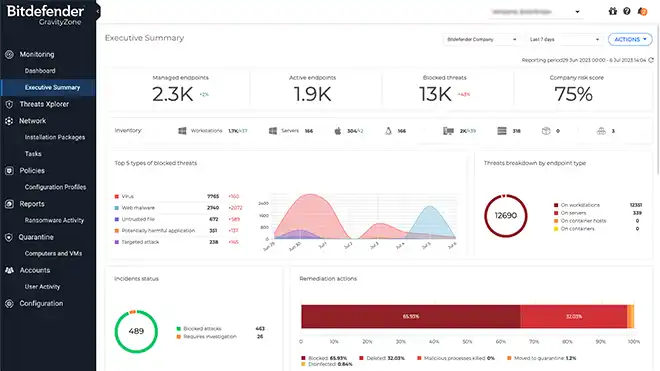
GravityZone Business Security is a unified endpoint protection solution built on Bitdefender’s modular GravityZone platform. It combines machine learning techniques, behavioral analysis, and continuous process monitoring to detect and block both known and unknown threats.
When a threat is detected the platform terminates processes, quarantines files, and rolls back malicious changes. Management runs through a single integrated console covering desktops, laptops, and physical or virtual servers, with a choice of cloud or on-premises deployment and no dedicated servers required.
Key features include:
- Multi-layered threat protection: Prevention, detection, and blocking combine machine learning techniques, behavioral analysis, and continuous monitoring of running processes. On detection, GravityZone takes immediate action including process termination, quarantine, and rollback of malicious changes.
- Ransomware mitigation: Detection and remediation technologies identify abnormal encryption attempts, whether the ransomware is known or new, and block the process. Affected files are then restored from backup copies to their original location on the endpoint.
- Network attack defense: The module inspects incoming, outgoing, and lateral traffic to protect against network-based attacks including brute force attempts, port scans, password stealers, and lateral movement, using multiple layers of security to stop them early and automatically.
- Risk management: Following a risk-based approach, the module reduces exposure and hardens endpoint surface area by discovering and prioritizing risky user behavior along with operating system and software misconfigurations, then guiding remediation.
- Web and content filtering: The Content Control module scans web traffic including SSL and blocks known and unknown malicious websites, files, scripts, and phishing attempts. It also restricts access to specific applications, sites, or web categories based on defined rules.
- Centralized management: A single integrated console provides one view across all security management components, with a risk dashboard that identifies high-risk systems, applications, or users and suggests relevant remediation actions.
- Optional add-on modules: Email security, patch management for Windows operating systems and applications, full disk encryption, and mobile security for iOS, Android, and ChromeOS can be layered onto the endpoint deployment.
Limitations (as reported by users on G2):
- Console organization: Reviewers describe the console layout as poorly organized, with unused features taking up space and endpoint detection and response event views feeling dated compared with alternatives.
- Policy learning curve: Configuring policies involves a steep learning curve, which makes training new administrators more difficult.
- Memory consumption: High memory usage on endpoints is reported, though reviewers note it can be tuned down on resource-constrained systems.
- Console search behavior: Search requires matching the beginning of a record name, so partial or mid-string searches do not return the expected results.
- Setup complexity and false positives: Initial setup and configuration are described as complex, with occasional false positives and pricing considered on the higher side.
Source: Bit Defender
7. Sophos Endpoint

Best for: Prevention-first protection with defaults enabled by default
Strengths: 60+ exploit mitigations and CryptoGuard ransomware rollback
Things to consider: Locating specific settings and slow support at times
Sophos Endpoint is a unified endpoint protection and EDR solution that blocks the techniques underlying attacks rather than the specific exploits attackers choose. Deep learning prevention, exploit mitigation, and CryptoGuard ransomware rollback run in a single lightweight agent across Windows, macOS, and Linux.
Recommended protection technologies are enabled by default with no tuning or per-application configuration required, and granular control is available where needed. Coverage extends to endpoints, servers, and mobile devices, and the agent shares threat and health telemetry across the wider Sophos ecosystem.
Key features include:
- Anti-exploitation mitigations: More than 60 proprietary exploit mitigations are enabled by default and applied to every running process. They block the techniques attackers must use to turn a vulnerability into a compromise, with no per-application configuration required.
- CryptoGuard anti-ransomware: CryptoGuard monitors file contents for malicious encryption and blocks the offending process, whether it runs on the victim’s computer or on a compromised network-connected device. Encrypted files are automatically reverted, and Master Boot Record protection guards drives against ransomware that leaves computers unbootable.
- Adaptive Attack Protection: When an active attacker is detected the agent switches to more aggressive protection to disrupt and contain the attack. It triggers on behavior combinations and known attack toolkit usage rather than file hashes, so it applies to novel variants.
- Deep learning and behavior analysis: Multiple AI models identify known and never-seen malware before execution, including AI-generated and AI-mutated variants. Behavior Analysis monitors process, file, and registry events over time, performs memory scanning, and detects code implanted in running processes.
- Attack surface reduction: Web Protection intercepts outbound browser connections to malicious sites, Web Control enforces acceptable-use policies including generative AI usage, Application Control blocks risky applications by category, and Peripheral Control restricts removable media, Bluetooth, and mobile devices.
- Data loss prevention and encryption: Data loss prevention monitors and restricts the transfer of files containing sensitive data, such as confidential files sent through web-based email. Device encryption manages BitLocker and FileVault policies and securely escrows recovery keys.
- Critical Attack Warning and tamper protection: Administrators are notified when adversarial activity is detected across multiple endpoints or servers. Kernel-level tamper protection blocks interference with the agent, catching bring-your-own-vulnerable-driver evasion before a malicious driver can act.
- Account health check: The feature identifies security posture drift and high-risk misconfigurations arising from policy settings or exclusions, letting administrators remediate the issues it surfaces with one click.
Limitations (as reported by users on G2):
- Finding specific settings: Reviewers report that locating a particular configuration option can be difficult because parts of the interface are vague, though administrator documentation covers the gaps.
- Alert granularity: Control over which alerts individual administrators receive is limited, so suppressing a noisy category can also suppress alerts the team considers critical.
- Support responsiveness: Slow support and long hold times are reported by reviewers across multiple review platforms.
- Large deployments: Initial deployment across large networks requires careful rollout planning to avoid disruption.
- Resource use and updates: Some reviewers report significant system resource consumption, along with occasional issues where updates do not re-enable the endpoint.
- Third-party integration: Integrating with non-Sophos systems to achieve a single view is described as the main difficulty by some users.
Source: Sophos
8. ThreatLocker Detect

Best for: Policy-driven EDR with real-time on-device enforcement
Strengths: Customizable IoC policies and automatic device isolation
Things to consider: Administrative overhead during policy tuning
ThreatLocker Detect is a policy-based endpoint detection and response solution that monitors endpoints for unusual events and indicators of compromise. It analyzes telemetry and behavior patterns drawn from other ThreatLocker modules and Windows event logs, then enforces predefined policies to contain threats.
IT teams create custom rules rather than relying on AI or undisclosed criteria, so detection logic stays visible. Policies are evaluated by the agent on the endpoint and enforced in milliseconds regardless of internet connectivity, so containment happens on the device without waiting for cloud analysis.
Key features include:
- Policy-based detection engine: Administrators build customizable, transparent rules with sets of conditions and responses that look for behavior crossing a defined threshold. Because policies are authored by the team, the detection criteria remain visible rather than hidden inside a vendor model.
- Real-time local enforcement: Policies are evaluated and enforced directly on the endpoint in milliseconds, independent of internet connectivity. Responses can trigger on ThreatLocker threat scores, producing on-device reaction without cloud round trips.
- Automated response actions: On detection the solution can send alerts, enforce rules, terminate high-risk tools such as PowerShell and Command Prompt, block risky network access including RDP, disconnect machines from the network, or activate lockdown mode, which blocks task execution, network access, and storage access.
- Ransomware and exfiltration controls: The engine detects excessive file writes or reads and blocks them immediately to stop encryption or data exfiltration in progress. Affected machines can be isolated automatically to contain an attack while the security team investigates.
- Community policy sharing: Teams access and contribute to a shared repository of detection policies maintained by the ThreatLocker Intelligence team and other administrators, drawing on a continuously updated library of indicators of compromise aligned to the MITRE ATT&CK framework.
- Microsoft 365 identity monitoring: Identity threat detection and response monitors Microsoft 365 logs for impossible travel, anonymous or infected device sign-ins, and other risky behavior. Policies are fully customizable using Microsoft 365 or Graph API log fields, with out-of-the-box policies provided.
- Integration and escalation: Alerts can be sent to SIEM or SOAR platforms, help desk tickets raised, and REST API calls made where automated response is not enabled. Cyber Hero MDR is available as an add-on for 24/7 review of detections.
Limitations (as reported by users on G2):
- Administrative overhead: The initial learning and policy-tuning phase carries significant administrative overhead, and understanding how the policies interact takes time.
- Onboarding staff: Training is described as time-consuming, with a substantial amount to learn before new administrators can work independently.
- Older hardware: The agent slows down some older devices, particularly those with limited system resources.
- Policy edge cases: Reviewers occasionally encounter configurations that are difficult to express as a policy and require vendor assistance to resolve.
Source: ThreatLocker
9. Symantec Endpoint Security Complete

Best for: Consolidating protection onto one agent and console
Strengths: Adaptive Protection with deception and AD defense
Things to consider: Heavy endpoint footprint and mobile support gaps
Symantec Endpoint Security Complete delivers integrated endpoint security through a single agent covering Windows, macOS, Linux, Windows S Mode, Android, and iOS, including servers. It is available as an on-premises, hybrid, or cloud-based deployment from one console.
The platform provides interlocking defenses at the device, application, and network levels across the entire attack chain, from attack surface reduction through post-breach response. A unified cloud-based management console applies AI to optimize security decisions and automate policy tuning.
Key features include:
- Adaptive Protection: The capability monitors the environment for applications and behaviors rarely or never used for legitimate business reasons, then blocks or reduces access to them so attackers cannot use them to stage an attack or dwell in the environment. Configuration is automated with no manual effort.
- Attack surface reduction: Breach Assessment continuously probes Active Directory for domain misconfigurations, vulnerabilities, and persistence using attack simulations. Device Control sets block or allow policies for USB, infrared, and FireWire devices, and Application Control allows only known-good applications to run.
- Attack prevention: Malware Prevention combines pre-execution detection using machine learning and sandboxing with signature-based methods, file and website reputation analysis, and behavioral monitoring of suspicious files. Exploit Prevention blocks memory-based zero-day exploits of common software vulnerabilities.
- Incident Prediction: The feature pairs AI with analysis of more than 500,000 real-world attack chains to predict an attacker’s next four to five moves, then applies mitigation policies to block those predicted actions before data can be encrypted or exfiltrated.
- Breach prevention: Deception uses fake files, credentials, network shares, cache entries, web requests, and endpoints to expose attackers and delay planned attacks. Active Directory security defends against lateral movement and domain administrator credential theft using unlimited obfuscation of AD resources.
- Detection and response: Behavior forensics records and analyzes endpoint behavior enriched with the MITRE ATT&CK framework. Threat hunting searches recorded event metadata and queries endpoints directly for indicators of compromise, and integrated response retrieves or deletes files, isolates endpoints, and blocks access.
- Network connection security: Rogue Wi-Fi network identification, hot spot reputation technology, and a policy-driven VPN protect network connections and support compliance for users working outside the office.
- Portfolio integrations: Published APIs and dedicated apps connect the platform with Symantec Cloud SWG, Validation and ID Protection, Content Analysis sandboxing, and Data Loss Prevention, so a threat detected at the web or email gateway can trigger a response at the endpoint.
Limitations (as reported by users on PeerSpot):
- Footprint on endpoints: Reviewers describe the product as heavy, taking up significant hard drive space and memory on protected devices.
- Installation and console usability: Installation and console usability are cited as challenges, with navigation made harder by the absence of a search facility in some sections.
- Mobile coverage: Support for iOS and Android devices is described as needing improvement relative to the desktop and server agents.
- Scalability: Scalability is raised as an area requiring work in larger deployments.
- Portal fragmentation: Managing multiple portals following the transition to Broadcom is described as confusing, and the platform migration caused problems for some organizations.
Source: Symantec (Broadcom)

10. Check Point Harmony Endpoint

Best for: Consolidating EPP, EDR, and XDR into a single client
Strengths: ThreatCloud AI engines with DLP and full disk encryption
Things to consider: Resource use during scans on lower-spec devices
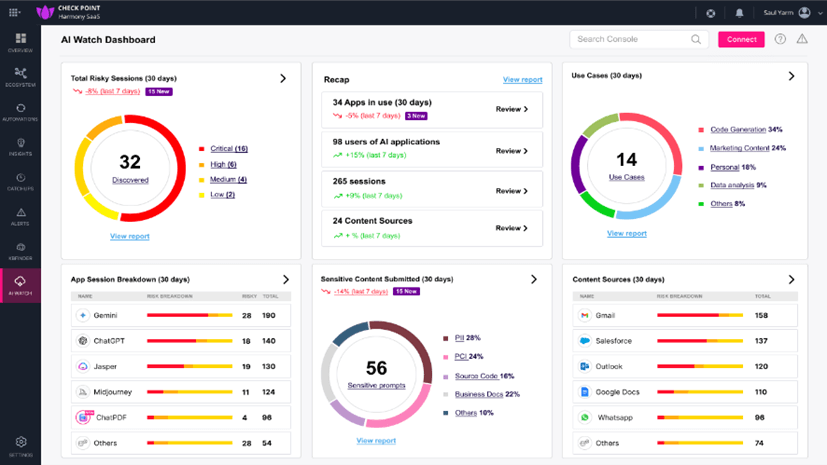
Check Point Harmony Endpoint is a consolidated endpoint security solution delivering EPP, EDR, and XDR capabilities in a single client with one management console. It supports on-premises, cloud, or MSSP management and can operate without constant cloud connectivity.
Coverage spans Windows, macOS, and Linux across laptops, desktops, servers, VDI, browsers, and mobile devices. Threat prevention draws on Check Point’s ThreatCloud AI, which applies more than 60 AI engines to deliver zero-day protection across those endpoints.
Key features include:
- Single agent architecture: Endpoint protection, endpoint detection and response, and extended detection and response capabilities are combined in one client with unified management, reducing the number of agents deployed on each device. Deployment covers on-premises, cloud, and MSSP-managed models.
- Ransomware and malware protection: The platform defends against zero-day and known threats using ThreatCloud AI intelligence and more than 60 AI engines. Behavioral Guard identifies fileless attacks and malicious behaviors before they cause harm to the endpoint.
- Zero-phishing and browser protection: Known and unknown phishing sites are blocked, including sophisticated zero-phishing attacks, which Check Point states happens with no impact on end users. Browser protection is delivered through the same client rather than a separate extension.
- Automated posture management: Automated vulnerability assessment and patch management reduce the attack surface, detecting weaknesses and remediating them enterprise-wide from the management console in a single click.
- Data protection: Data loss prevention safeguards sensitive information and full disk encryption protects data at rest, supporting compliance and regulatory requirements. Check Point states that around 70 percent of data loss incidents originate at endpoints.
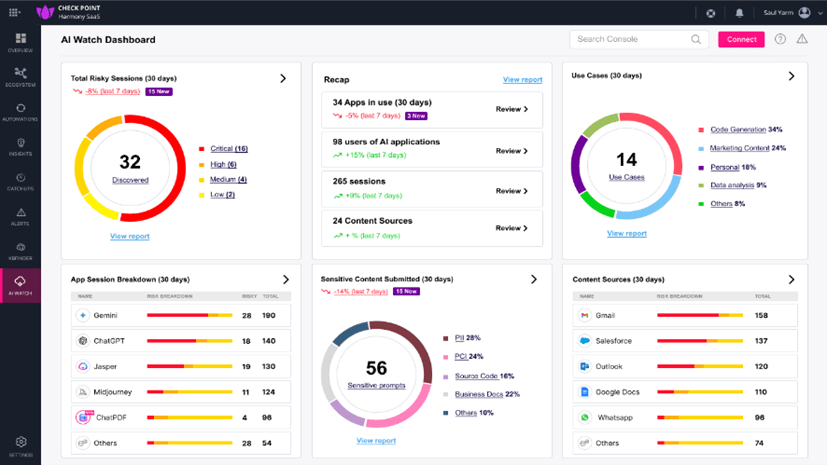
- Generative AI visibility: The platform identifies which generative AI tools the workforce is using, assesses their risk level, and applies AI-powered data classification to support compliance and data protection around those tools.
- Ecosystem integration and reporting: Harmony Endpoint integrates with Check Point’s broader network, cloud, and mobile security architecture for unified policy management and threat intelligence sharing, and provides centralized dashboards, threat analytics, compliance reporting, and automated alerts.
Limitations (as reported by users on G2):
- Resource consumption: Reviewers report significant system resource use during scans and updates, which can affect performance on older or lower-specification devices.
- Setup complexity: Initial deployment and configuration are described as difficult for inexperienced administrators, particularly in mixed environments with multiple protection features enabled.
- Console speed and reporting: The management console is described as slow for daily tasks such as filtering endpoints and reviewing events, and custom reporting is seen as insufficiently flexible for non-technical stakeholders.
- Policy tuning: Policy tuning is time-consuming in larger environments, and some advanced settings are considered unintuitive.
- Support and integration: Slow technical support responses are reported, alongside limited third-party application integration and customization options.
- Pricing: Several reviewers describe the pricing structure as high relative to alternatives.
Source: Check Point
11. Microsoft Defender for Endpoint
Best for: Microsoft-centric estates wanting native protection
Strengths: Automatic attack disruption and exposure management
Things to consider: E5 licensing for advanced response capabilities
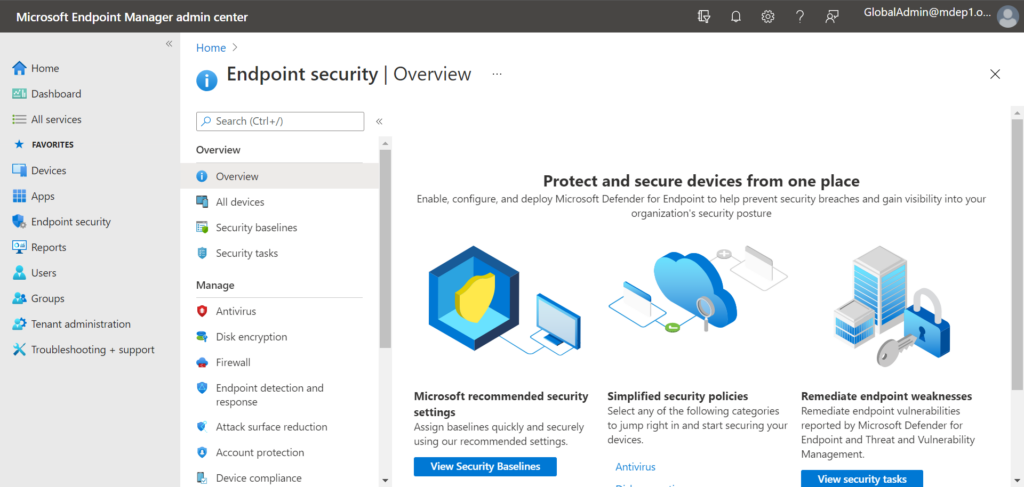
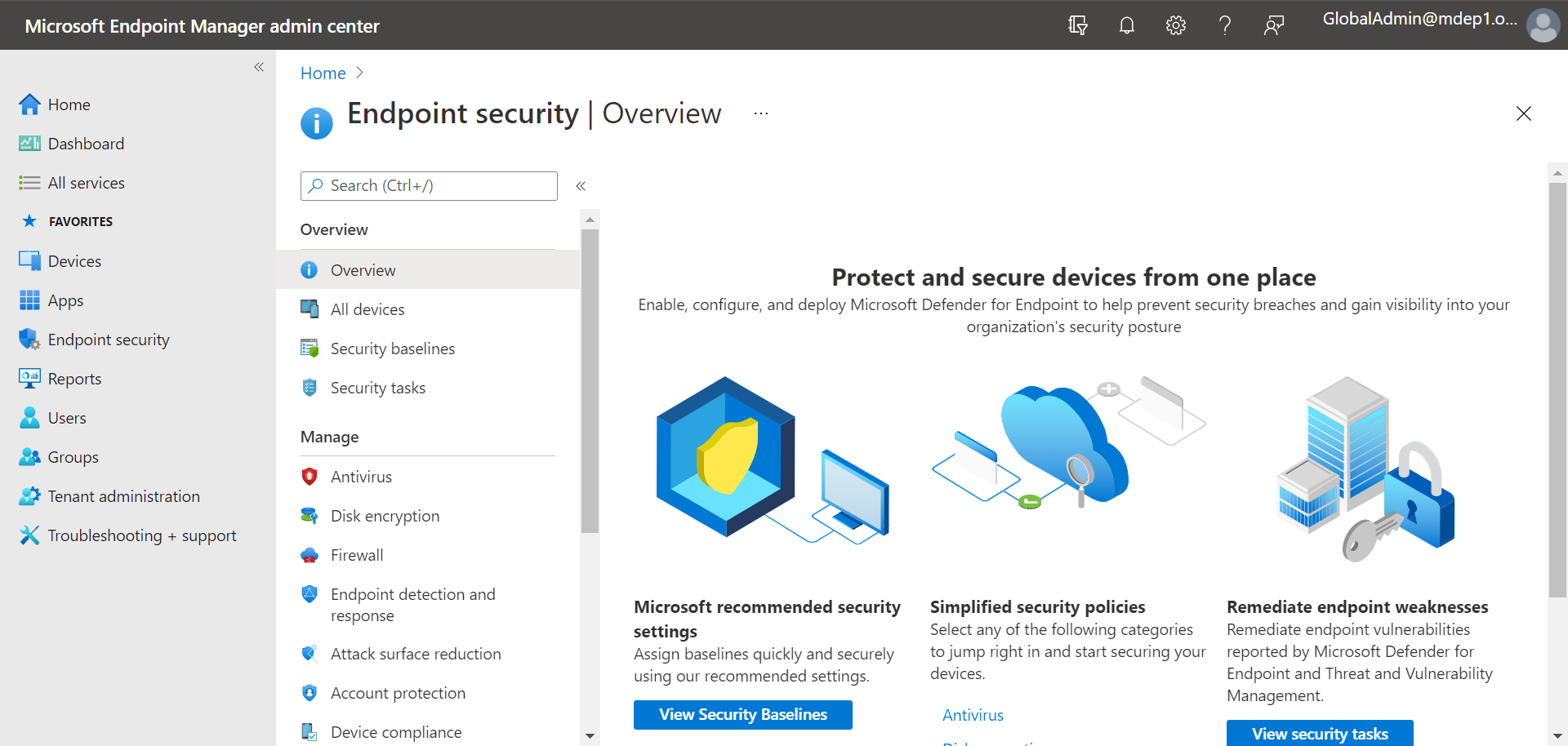
Microsoft Defender for Endpoint is a cloud-native endpoint security platform providing next-generation antivirus, endpoint detection and response, and vulnerability management. It sits at the core of Microsoft Defender XDR and covers Windows, macOS, Linux, Android, iOS, and IoT devices.
Threat intelligence draws on 84 trillion daily signals and 10 thousand experts across 72 countries. The platform correlates signals across endpoints, identity, email, and cloud to contain attacks already in progress, and Microsoft reports an average of three minutes to disrupt ransomware.
Key features include:
- Automatic attack disruption: Ransomware attacks are disrupted automatically by blocking lateral movement and remote encryption in a decentralized way across all devices. Correlation across endpoints, identity, email, and cloud contains in-progress attacks without manual intervention.
- Endpoint detection and response: The platform continuously records endpoint activity and surfaces prioritized alerts for investigation and threat hunting, giving analysts the history needed to trace how an incident developed across the device estate.
- Next-generation protection: Machine learning and behavioral analysis block ransomware, fileless malware, and zero-day threats. Protection is built into Windows and extended across macOS and Linux, supporting agentless deployment and deep endpoint visibility.
- Exposure management: Pre- and post-breach capabilities continuously discover, prioritize, and help remediate misconfigurations and software vulnerabilities, providing a view of the attack surface and anticipating a cyberattacker’s likely next move.
- Network detection and response: Administrators see and manage the attack surface from a single view across managed and unmanaged Windows, Linux, macOS, iOS, Android, IoT, and network devices, including devices that were never enrolled.
- Security Copilot: Built-in security-specific generative AI supports rapid investigation and response to incidents, summarizing activity and guiding analysts through remediation inside the same console.
- Flexible enterprise controls: Granular controls cover settings, policies, web and network access, detections, and automated workflows. Unified endpoint management streamlines security and IT collaboration to prevent misconfigurations and coverage gaps.
Limitations (as reported by users on G2):
- Non-Microsoft integration: Reviewers report challenges integrating with third-party applications and non-Microsoft platforms, which adds complexity to deployment.
- Licensing complexity: Advanced response capabilities require E5 licensing, and reviewers describe the licensing and bundling model as difficult to navigate and price.
- Cross-platform detection depth: Detection quality on macOS and Linux is described as improving but still behind Windows, with some Linux configurations not fully supported.
- Setup and portal navigation: Initial setup and configuration are complex for administrators new to the Microsoft ecosystem, and some features require moving between multiple portals or deep Microsoft expertise.
- Notification volume: Some reviewers report a high volume of notifications, and note that managing security policies across all protection modules is an ongoing, complex process.
Source: Microsoft
XDR and Managed Detection Solutions
12. TrendAI Vision One Endpoint Security

Best for: Consolidating endpoint, cloud, email, and network detection
Strengths: Native EDR and XDR with cyber risk exposure management
Things to consider: Cluttered console and a heavy agent on endpoints
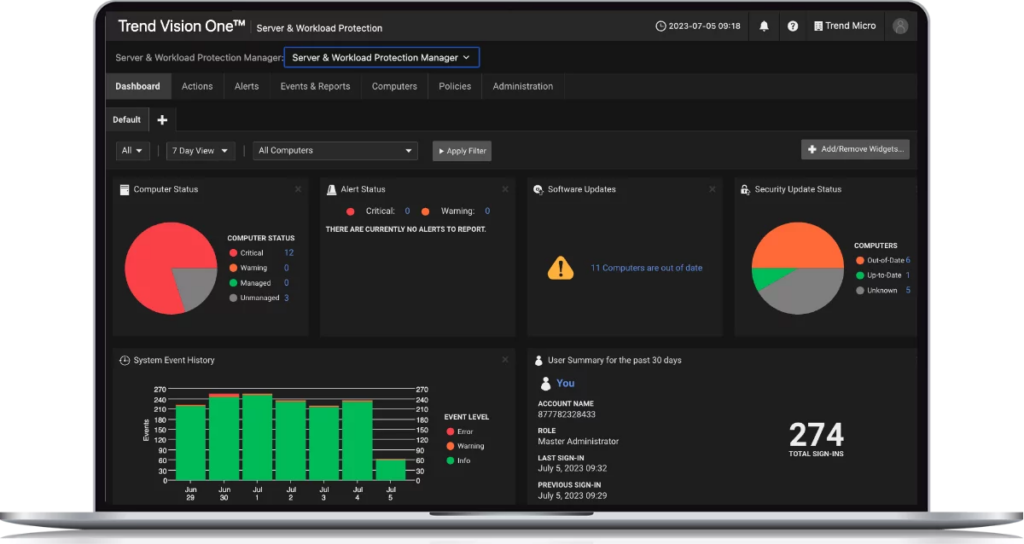
TrendAI Vision One Endpoint Security provides integrated threat detection and response, proactive risk management, and centralized visibility from a single platform. Alongside standard workstations it protects systems that are harder to secure, including servers, IoT devices, and legacy environments.
Native endpoint detection and response and extended detection and response span endpoints, servers, email, cloud, and networks using platform telemetry, so detections correlate across layers rather than sitting in separate tools. Multiple layers of security apply at every stage of the attack chain.
Key features include:
- Multi-layer attack chain coverage: Threats are stopped using multiple layers of security across every stage of the attack chain. Advanced algorithms and AI are applied to defend against emerging threats and evolving attack techniques rather than known signatures alone.
- Native EDR and XDR: Detection and response run natively across endpoints, servers, email, cloud, and networks, powered by TrendAI Vision One telemetry. Consolidating those signals eliminates data silos and information gaps between separate security tools and applications.
- Coverage for diverse environments: The platform protects systems that standard agents struggle with, including servers, IoT devices, and legacy environments, from the same all-in-one platform rather than requiring separate products for each.
- Cyber Risk Exposure Management: Assets that may be exposed to attack are presented in a holistic view, with response actions prioritized using tailored remediation guidance and automated security playbooks to direct effort at the highest-risk items.
- Automated incident response: Automated incident response reduces manual intervention and limits potential damage. A single pane of glass gives security and IT teams the visibility to monitor and manage threats across the entire organization from one console.
- Managed detection and response: TrendAI Vision One MDR augments existing security operations with 24/7 monitoring, detecting, investigating, and responding to threats across all security layers for teams without round-the-clock staffing.
Limitations (as reported by users on G2):
- Learning curve: Initial setup, policy tuning, and use of advanced features take time, particularly for new administrators or large environments.
- Console navigation: Reviewers describe the console as clunky or cluttered, with navigation across modules not always seamless and separate configuration required per module.
- Agent weight: The agent is reported as heavy and affecting endpoint performance, and policy deployment can take around 10 to 15 minutes to reach devices.
- Integration gaps: Some third-party integrations are unavailable through the API connector, requiring custom development for a two-way exchange of telemetry.
- Console responsiveness and access control: Lag is reported when querying multiple modules at once, and role-based access control is described as needing more granularity.
- Agent removal and support: Removing a corrupted agent can be difficult, and support is described as challenging unless a ticket is escalated.
Source: TrendMicro
13. Palo Alto Networks Cortex XDR

Best for: Correlating endpoint, network, cloud, and identity telemetry
Strengths: Root cause analysis with technique-specific prevention modules
Things to consider: Windows-first feature depth and complex implementation
Cortex XDR connects data from endpoint, network, cloud, identity, and email sources and applies AI to detect and prioritize attacks regardless of where they originate. Prevention modules are built to stop each technique used in modern attacks, from zero-day exploits to fileless malware and hijacked legitimate processes.
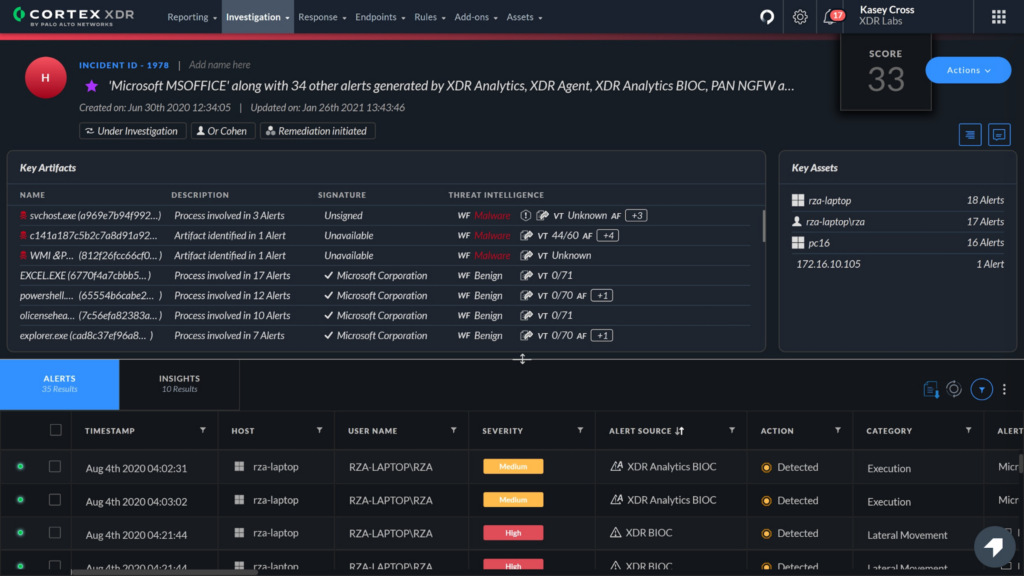
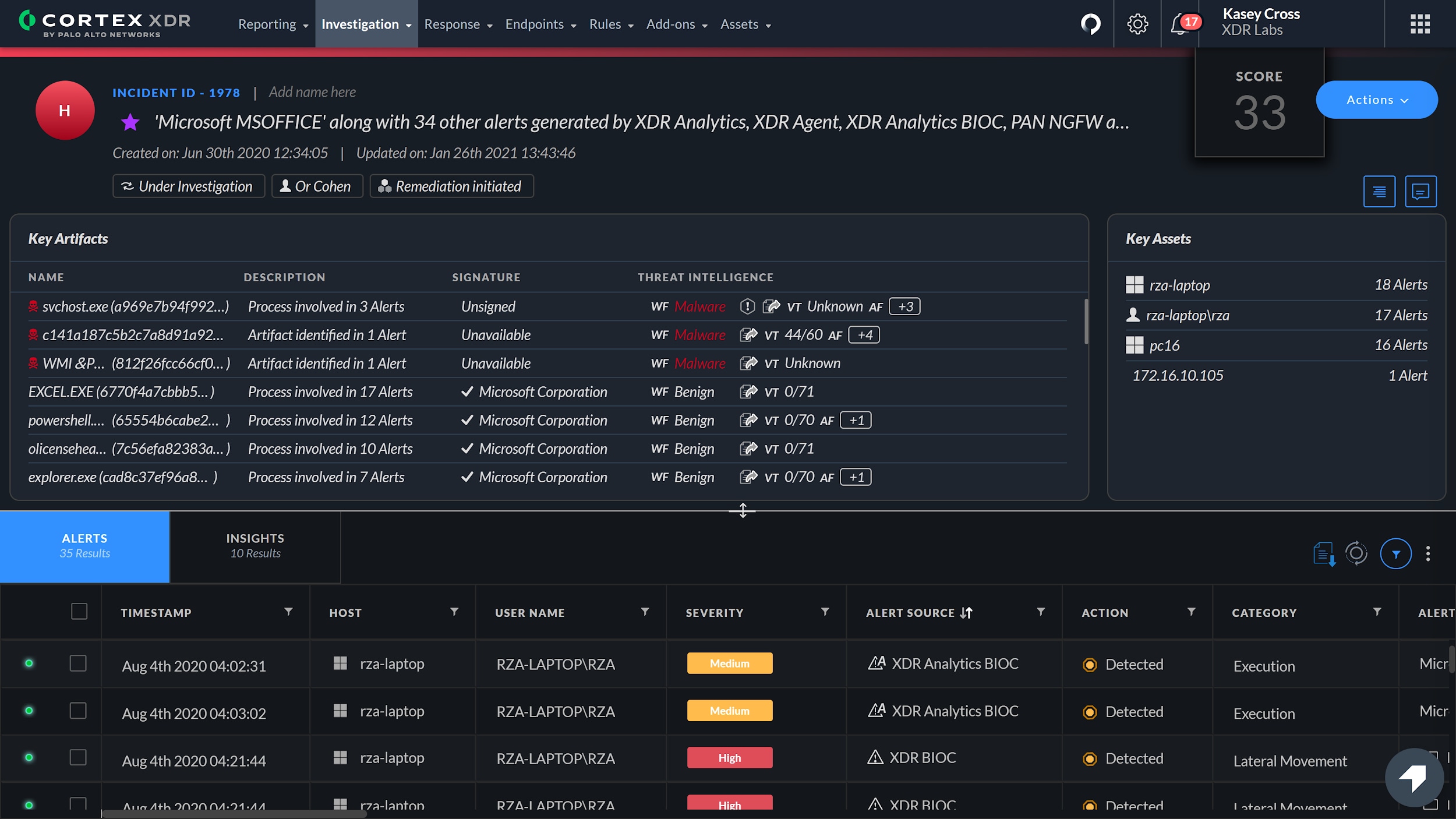
The platform reveals the root cause of alerts and displays artifacts and investigative details in one view, uncovering the execution path behind every alert. Native automation disrupts attacks, and all telemetry sits in a single data lake that also underpins Cortex XSIAM.
Key features include:
- Cross-vector detection: Cortex XDR connects endpoint, network, cloud, identity, and email data and applies AI to detect and prioritize attacks regardless of origin. Palo Alto Networks notes that 84 percent of attacks span multiple vectors rather than remaining on the endpoint.
- Technique-based prevention modules: Dedicated prevention modules target each technique used in modern attacks, covering zero-day exploits, fileless malware, and the hijacking of legitimate processes, rather than relying on detection after a payload has executed.
- Root cause analysis: The platform uncovers the execution path of every alert and displays artifacts and investigative details in a single view, so analysts can trace how an adversary gained access without assembling the picture from separate tools.
- Cortex AgentiX Assistant: A fleet of adaptive AI agents investigates and responds at machine speed. Native automation runs response actions to disrupt an attack once initial access has been detected, shortening the window in which an adversary can move.
- Single data lake: All telemetry is held in one data lake, which lowers operational overhead and forms the foundation for Cortex XSIAM. XDR can be extended with NG-SIEM, endpoint data loss prevention, exposure management, email security, and cloud security in one analyst experience.
- Unit 42 managed services: Unit 42 MDR operates natively inside the customer’s Cortex XDR tenant to hunt, monitor, and remediate. Managed Threat Hunting combines Unit 42 threat intelligence with platform analytics, and incident response and cyber risk management services are also available.
Limitations (as reported by users on G2):
- Platform feature gaps: Reviewers report a functionality gap between the Windows, Linux, and macOS versions, with capabilities such as folder restrictions available only on Windows.
- Implementation complexity: The product is described as complex to implement and manage, with challenging configuration when integrating into existing systems.
- Operating system restrictions: Some reviewers note that the agent restricts core operating system functionality and creates usability problems on lower-specification systems.
- Authentication integration: The absence of SAML and LDAP integration is raised as a limitation for user authentication.
- Cost and false positives: Licensing costs are described as high, and false positives are reported as affecting analyst efficiency.
Source: Palo Alto Networks
14. Barracuda Managed XDR Endpoint Security

Best for: Outsourcing endpoint monitoring to a 24/7 external SOC
Strengths: SOC-led containment with one-click ransomware rollback
Things to consider: Limited self-service management and report customization
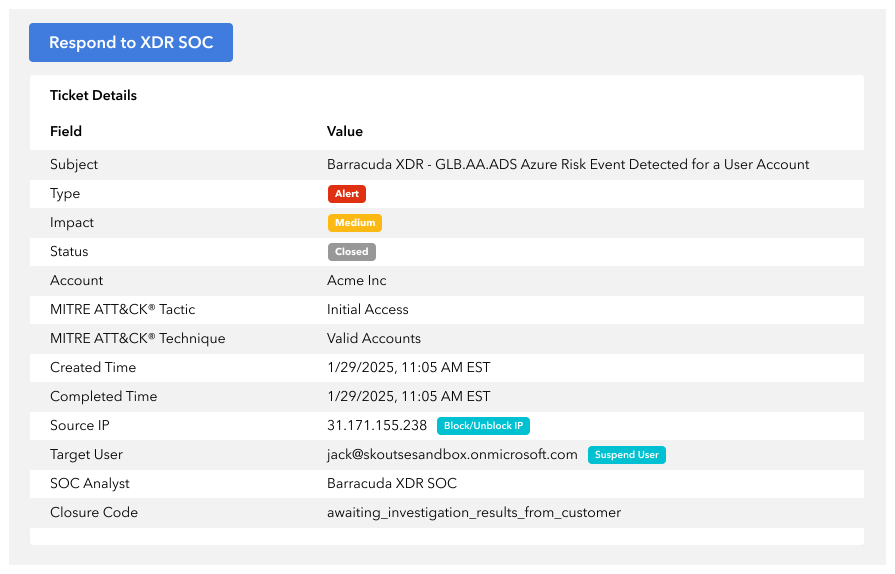
Barracuda Managed XDR Endpoint Security is a managed detection and response service that overlays a 24/7/365 global Security Operations Center on endpoint telemetry. It collects security telemetry from endpoints to identify and investigate threats that evade traditional endpoint protection.
The SOC provides remediation guidance or orchestrates automated responses without adding workload to internal IT staff, and a dashboard shows every identified threat and its remediation. The underlying endpoint detection engine is SentinelOne, which supplies the behavioral AI and rollback capabilities.
Key features include:
- 24/7/365 SOC monitoring: Global security experts continuously monitor endpoint activity and manage threat response, supplementing internal teams with skilled security staff. Continuous logging and monitoring also support compliance and cyber insurance requirements.
- Behavioral AI detection: The service monitors kernel-level processes in real time to detect ransomware execution, application misuse, remote code execution, fileless attacks, crypto mining, and command shell activity. Because the engine is not limited by a requirement for cloud analysis, new behaviors are still distinguished from legitimate activity.
- Automatic Threat Response: Pre-configured workflows activate the moment a threat is identified, isolating compromised endpoints, blocking malicious processes, and terminating harmful activity without requiring administrator intervention.
- Expert-led containment: Barracuda SOC analysts assess threat severity, select a containment strategy, and isolate compromised devices or terminate malicious processes, combining automation speed with the judgment and adaptability of human analysts.
- Ransomware rollback: With one click the SOC can roll an endpoint back to its last saved pre-attack state. Rollbacks undo malicious files, registry keys, and system configuration changes, recovering encrypted files without a full restore from external backups.
- SOAR automation: SentinelOne is integrated with security orchestration, automation, and response to automate incident-handling workflows including threat enrichment, alert escalation, response execution, and detailed report generation.
- Flexible service model: Organizations can choose a monitored endpoint service that works with their existing endpoint security product, or a fully managed service, and can extend coverage to servers, network, email, and cloud security within the same suite.
Limitations (as reported by users on G2):
- Self-service management: Reviewers want the ability to log in and manage the underlying SentinelOne deployment directly rather than working through the managed service.
- Reporting customization: A lack of customization limits reporting and management flexibility, with several reviewers asking for more client-friendly and configurable reports.
- Portal fragmentation: Each product in the suite has its own dashboard, requiring frequent logins and increasing the amount administrators need to learn and manage.
- Endpoint agent scope: The agent on the device is described as limited, with program management requiring access to the portal instead.
- Detection timing and setup: Time to initial detection is raised as an area to improve, partly attributed to third-party sync limits, and fine-tuning the service takes time. No mobile app is available for monitoring alerts.
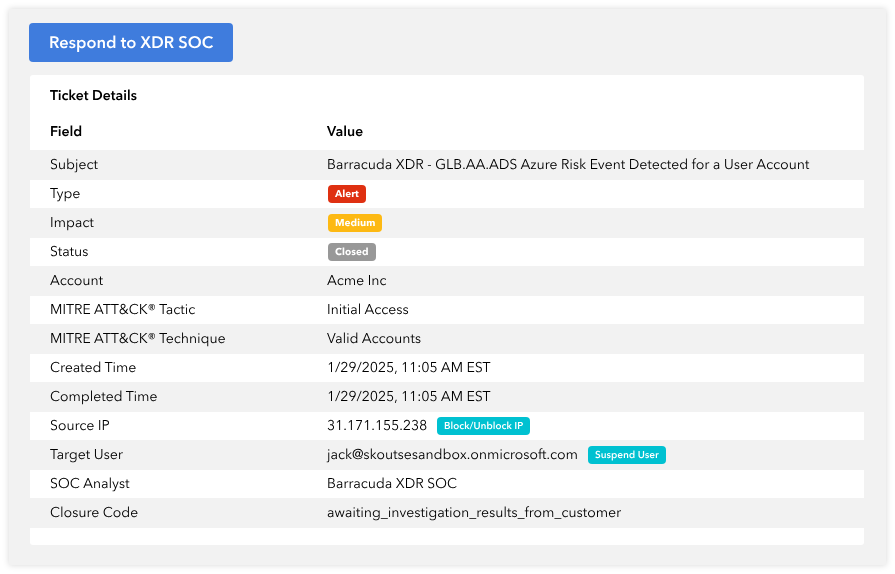
Source: Barracuda
15. Huntress Managed EDR

Best for: Smaller teams and MSPs needing SOC-backed endpoint coverage
Strengths: 24/7 AI-assisted SOC with active threat remediation
Things to consider: Limited alert and report customization options
Huntress Managed EDR pairs endpoint detection and response technology with a 24/7 AI-assisted Security Operations Center. Rather than licensing another vendor’s EDR engine, Huntress builds and owns its detection technology, and the SOC triages detections and delivers incident reports with remediation steps.
Coverage spans Windows, macOS, and Linux endpoints. Huntress reports more than 5 million endpoints protected, a false positive rate under 1 percent, and an 8 minute mean time to respond. The SOC actively remediates threats on endpoints rather than only alerting on them.
Key features include:
- Persistent footholds detection: The platform identifies abuse of legitimate applications and processes that attackers use to stay hidden on endpoints, targeting the persistence mechanisms that let an intruder survive reboots and routine cleanup.
- Malicious process behavior analysis: Because attacker tooling changes constantly while techniques stay consistent, detection is based on behavioral analysis of process activity rather than matching known files or hashes.
- Attack Disruption and lateral movement detection: A real-time Attack Disruption engine detects and impairs attacker activity and alerts the SOC. Separate detections identify stealthy lateral movement as a threat actor looks for additional targets on the network.
- Ransomware Canaries: Monitored canary files give early indication and detection of ransomware activity on an endpoint, allowing the threat to be contained before encryption spreads across more files and systems.
- Endpoint attack visibility: External Recon reports on exposed ports that give attackers an opening into the network, and the platform discovers and alerts on potentially unsecured credentials stored on endpoints before attackers find and abuse them.
- Threat containment and active remediation: The SOC actively remediates threats to evict them from endpoints rather than handing findings back to the customer, and provides guidance on improving defenses against future attacks.
- Managed Microsoft Defender Antivirus: Huntress manages Microsoft Defender Antivirus at no additional cost, extending an existing Microsoft investment rather than requiring organizations to replace the antivirus they already run.
Limitations (as reported by users on G2):
- Exception management: Reviewers want improvements to exception handling, along with better visibility into antivirus scans and quarantined files.
- Alerting and reporting customization: Limited ability to tailor alerting and reporting is the most common request, with reviewers asking for more detail and faster report generation.
- Alert clarity: Unclear alerts and false positives are reported as disrupting workflows for some teams.
- Integration coverage: Support for third-party antivirus platforms is limited, though reviewers note this is improving.
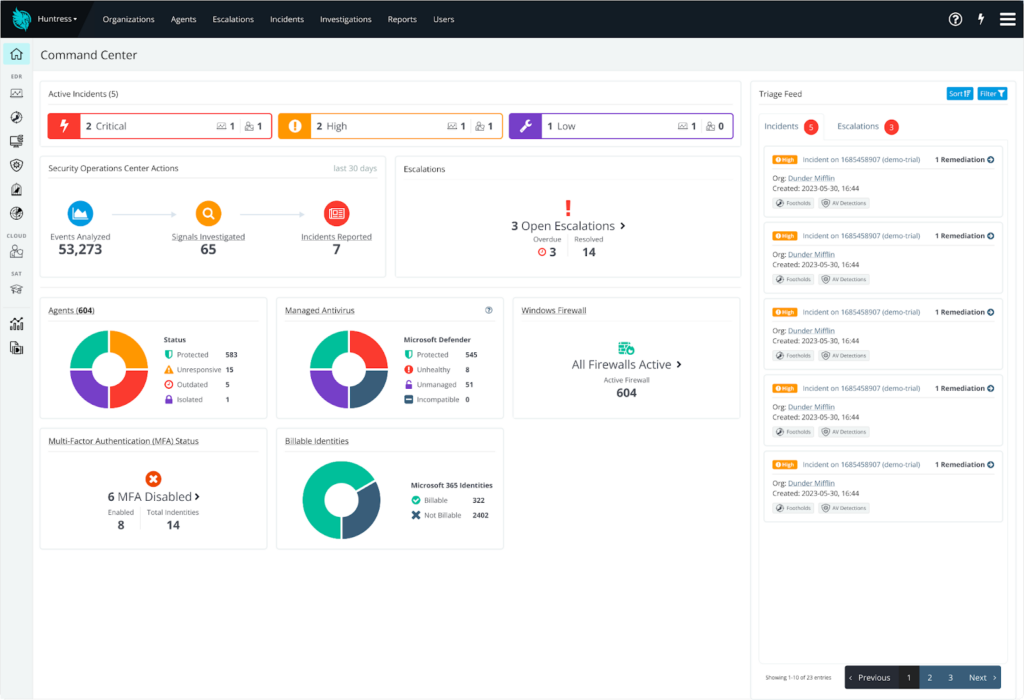
Source: Huntress
How to Choose the Right Endpoint Security Solution
Selecting the right endpoint security solution depends on your workforce model, risk exposure, compliance requirements, and internal security maturity. Organizations should first determine whether their primary challenge is device-level threat protection, secure remote access, BYOD enablement, or a combination of these factors.
When to choose a remote work or BYOD-focused solution:
If employees use personal devices or operate in hybrid environments where full device control is not feasible, a secure workspace or BYOD-focused platform may be more appropriate. These solutions isolate corporate data, enforce zero-trust access policies, and protect business applications without intrusive device management. They are especially useful for contractors, distributed teams, or privacy-sensitive environments where installing full EDR agents on personal devices may not be acceptable.
In many cases, organizations deploy both approaches: endpoint security for corporate-managed assets and secure workspace solutions for BYOD users. This layered model ensures strong threat detection while maintaining flexibility for remote work.
When to choose traditional endpoint security (EPP/EDR/XDR):
If your organization manages corporate-owned devices and needs strong threat prevention and incident response capabilities, an endpoint protection platform combined with EDR or XDR is typically the right foundation. These tools focus on detecting malware, ransomware, lateral movement, and advanced persistent threats. They are well suited for environments where devices are centrally managed and security teams require deep visibility and forensic telemetry.
Organizations with mature security operations centers (SOCs) may benefit from EDR or XDR platforms that integrate with SIEM and identity systems. If internal expertise is limited, MDR services can provide 24/7 monitoring and guided response without building a full in-house team. A growing option is an agentic SOC, where AI agents autonomously triage and investigate alerts under defined guardrails; this directly targets alert fatigue, since a large share of alerts go uninvestigated with legacy tooling, while keeping analysts in control of critical decisions.
Key evaluation criteria:
- Coverage across devices and platforms: Ensure compatibility with all operating systems, mobile devices, servers, and virtual environments in your infrastructure.
- Detection and response depth: Assess whether prevention-only controls are sufficient or if behavioral analytics, threat hunting, and automated remediation are required.
- Deployment and management complexity: Cloud-based consoles and lightweight agents simplify rollout and reduce administrative overhead.
- Integration with existing security tools: Strong API support and integration with SIEM, identity, firewall, and email systems improve cross-domain visibility and response coordination.
- Scalability and performance impact: Choose solutions that scale with business growth and do not degrade endpoint performance.
- Automation capabilities: Evaluate automatic containment, rollback, device isolation, and policy enforcement to minimize response time.
- Compliance alignment: Confirm support for encryption, logging, audit trails, and reporting required by regulatory frameworks.
- Cost structure: Compare per-user or per-device pricing with total cost of ownership, including operational and staffing impact.
Conclusion
Endpoint security has evolved beyond traditional antivirus into a multi-layered discipline that combines prevention, detection, response, and centralized management. As organizations support remote work, BYOD, and cloud-driven operations, protecting endpoints requires visibility across devices, strong policy enforcement, and automated threat response. A well-chosen solution should align with business risk, operational complexity, and compliance requirements while maintaining performance and usability across the environment.
Endpoint security has evolved beyond traditional antivirus into a multi-layered discipline that combines prevention, detection, response, and centralized management. As organizations support remote work, BYOD, and cloud-driven operations, protecting endpoints requires visibility across devices, strong policy enforcement, and automated threat response. A well-chosen solution should align with business risk, operational complexity, and compliance requirements while maintaining performance and usability across the environment.

Any worker. Any laptop. Any AI workflow. Fully secured.
Schedule a demo to see how Blue Border® secures company data and apps without shipping laptops, running VDI, or managing personal endpoints.